
DNS (Domain Name System) is a fundamental facilitator of several networking technologies such as mail servers, Internet browsing, and streaming services e.g. Netflix and Spotify, among others.
It works on a special computer called a DNS server – which keeps a database record of several public IP addresses along with their corresponding hostnames for it to resolve or translate hostnames to IP addresses upon user request.
This happens so that we would not need to bother ourselves with remembering the IP addresses of the different websites we visit.
The DNS (Domain Name System) server IP address in Linux can vary depending on your network configuration and settings. Your system might use DNS servers provided by your Internet Service Provider (ISP), a local DNS resolver, or public DNS servers such as those provided by Google, OpenDNS, or others.
You can find the DNS server IP addresses on your Linux system using the methods mentioned in the previous response. Common DNS server IP addresses include:
Google DNS:
IPv4: 8.8.8.8 and 8.8.4.4
IPv6: 2001:4860:4860::8888 and 2001:4860:4860::8844
OpenDNS:
IPv4: 208.67.222.222 and 208.67.220.220
Cloudflare DNS:
IPv4: 1.1.1.1 and 1.0.0.1
IPv6: 2606:4700:4700::1111 and 2606:4700:4700::1001
Your ISP’s DNS Servers:
You can find the DNS server addresses in your router settings or contact your ISP.
Local DNS Resolver (127.0.0.1):
On some systems, a local DNS resolver may be running on 127.0.0.1.
To determine the specific DNS server IP address on your Linux system, you can use one of the methods mentioned earlier, such as checking the /etc/resolv.conf file, using the systemd-resolve command, or using the nmcli command. The actual DNS server IP address can be found in the output of these commands.
While there are several things we can discuss on DNS servers such as redirection and malware attack prevention, our focus today is on how to find out your very own dns server IP address.
There are several ways to check for it depending on the Operating System that you’re running but Linux, BSD, and Unix-like systems all share the same method so let’s begin with them.
Table of Contents
How to Find My DNS Server IP Address
1. To find out your DNS Server IP address, use the following cat command or less command.
cat /etc/resolv.confor
less /etc/resolv.conf
2. Another way is to use the following grep command.
grep "nameserver" /etc/resolv.conf
3. In newer Linux distributions that use systemd, you can use the systemd-resolve command to check the DNS server.
systemd-resolve --status | grep "DNS Servers"4. If you’re using NetworkManager, you can use the nmcli command to get the DNS server information.
How to Find My Website DNS Server IP Address
To find the DNS server IP address for a specific website, you can use a command-line tool called nslookup or dig. Here’s how you can do it:
Using nslookup:
nslookup is a command-line tool used for querying the Domain Name System (DNS) to obtain domain name or IP address information.
It is available on most operating systems, including Windows, Linux, and macOS. The primary purpose of nslookup is to troubleshoot DNS-related issues, gather information about DNS records, and perform various DNS-related tasks.
Open a command prompt or terminal and type the following command:
nslookup drupalwebhosting.in
Using dig:
dig stands for “Domain Information Groper,” and it is a command-line tool used for querying DNS (Domain Name System) servers. dig is widely available on Unix-based operating systems, including Linux and macOS. It is often used as an alternative to the older nslookup tool.
To find out a website DNS Server IP address, you can use the following dig command, which is used to query DNS information.
dig drupalwebhosting.in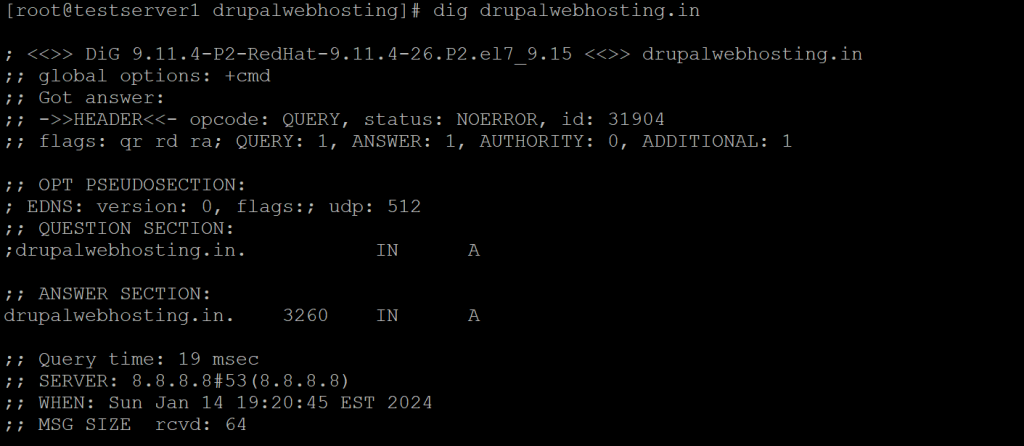
The output will provide you with a list of IP addresses for authoritative nameservers for your website (i.e., the DNS servers responsible for your domain).


