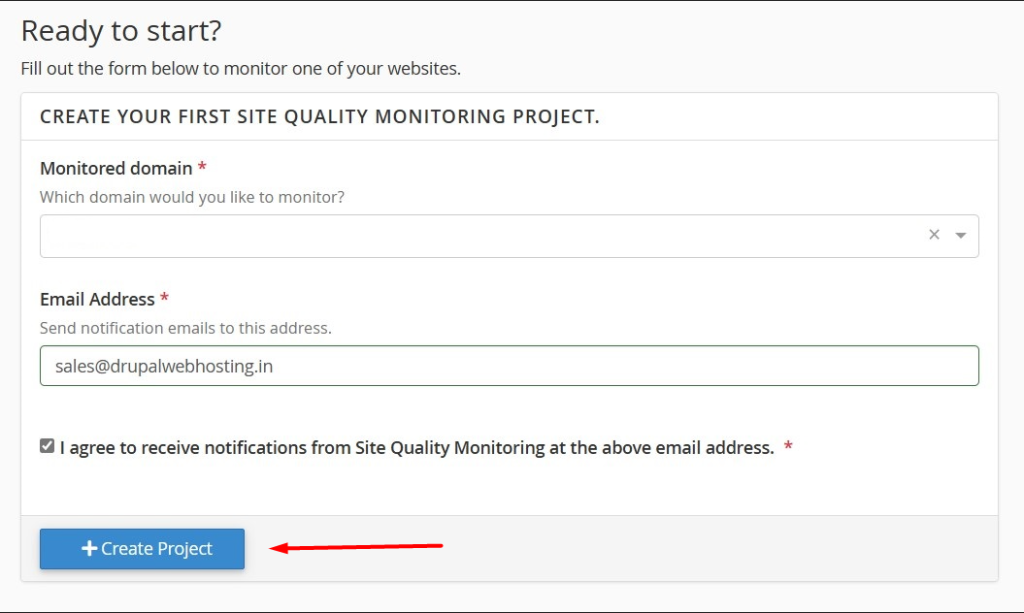
Site Quality Monitoring ensures that your website is accessible and discoverable by scanning it for common issues.
cPanel is a web hosting control panel that provides a graphical interface and automation tools to simplify the process of hosting a website.
Site quality monitoring typically involves assessing and tracking various aspects of a website’s performance, security, and overall health. This may include monitoring website uptime, page load times, server resource usage, security vulnerabilities, and other relevant metrics.
This helps you diagnose and fix items. You can ensure that your monitored websites have all the following features:
- Fast page load times
- Appropriate image sizes
- No broken links
- Well-configured cookies
- Continuous uptime monitoring
- Mobile optimization
- Lighthouse scores
- Up-to-date security certificates
If you are looking for site quality monitoring tools or features, you may need to use third-party services or plugins integrated with cPanel. Many website owners use external tools or services like Google Analytics, Pingdom, GTmetrix, or other monitoring solutions to keep track of their site’s performance.
To implement site quality monitoring, you can consider the following steps:
- Choose a Monitoring Tool: Select a third-party monitoring tool or service that suits your requirements. Ensure it provides features like uptime monitoring, performance analysis, security checks, and other relevant metrics.
- Integrate with cPanel: Some monitoring tools offer integrations with cPanel or provide instructions on how to set up monitoring for websites hosted on cPanel servers. Follow the guidelines provided by the chosen monitoring tool.
- Configure Monitoring Parameters: Set up parameters for monitoring, such as the frequency of checks, the types of metrics to monitor, and notification preferences in case of issues.
- Regularly Review Reports: Keep an eye on the monitoring reports to identify any performance or security issues. This proactive approach can help you address potential problems before they significantly impact your website.
Benefits of site quality monitoring
- Improved Search Engine Rankings:
- Crawl Error Detection: Identifies crawl errors that can hinder search engine indexing, ensuring your site remains visible and ranks higher in search results.
- Page Speed Insights: Provides detailed reports on page loading times, a critical factor in SEO rankings.
- Enhanced User Experience:
- User Experience Metrics: Tracks key metrics like bounce rate and time on site.
- Mobile Responsiveness Check: Ensures your site is mobile-friendly, a vital aspect for retaining mobile traffic.
- Proactive Site Health Monitoring:
- Security Alerts: Notifies you of any potential security threats.
- Broken Links and Resource Check: Identifies and helps you fix broken links and missing resources.
- Content Optimization:
- SEO Recommendations: Offers tailored suggestions to optimize your web content.
- Keyword Performance Analysis: Monitors how well your chosen keywords are performing.
The Site Quality Monitoring feature is designed for a broad range of users, ensuring everyone involved in website management can benefit:
- Website Owners: If you own a website, this tool allows you to keep an eye on your site’s health and performance, ensuring it always performs at its best. It’s particularly useful if you’re looking to improve your site’s SEO without deep technical knowledge.
- SEO Specialists: For SEO experts, this tool provides valuable insights into how well a website is optimized for search engines. It helps in fine-tuning SEO strategies and making informed decisions to boost rankings.
- Webmasters and Developers: Webmasters and developers can utilize this feature to monitor and improve the technical aspects of a website. From site speed to security issues, it offers a comprehensive overview to maintain optimal site performance.
- Digital Marketing Professionals: Those in digital marketing can use these insights to align their strategies with the website’s performance metrics, enhancing overall marketing effectiveness.
How to use site quality monitoring
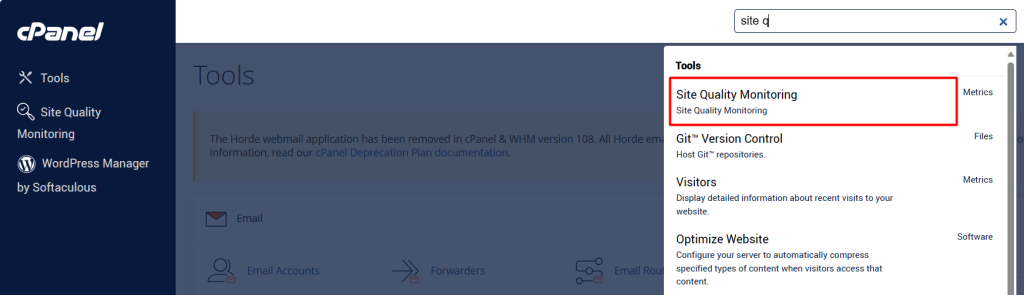
- Login to cPanel
- Navigate to Site quality monitoring
- Select domain name to monitor
- Enter email address to receive notifications
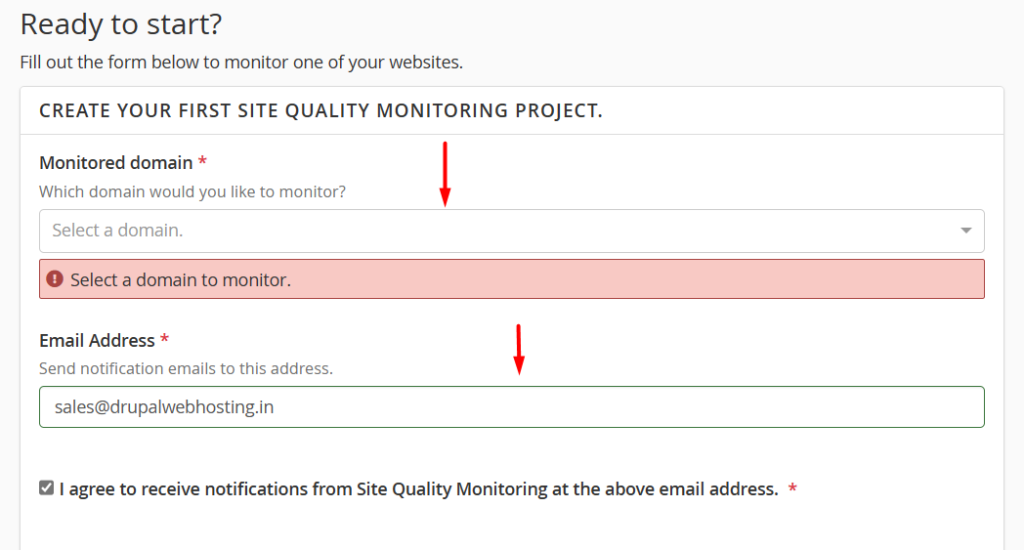
- Agree to receive notification
- And finally click on Create Project